The technical SEO issues that most often hurt contractor rankings are crawl and indexing blocks, mobile content gaps, slow and heavy pages, duplicate pages, mixed-content security errors, and orphaned pages. Fix them in that order, because a page Google cannot crawl or index cannot rank, no matter how strong its content or backlinks are.
Key Takeaways
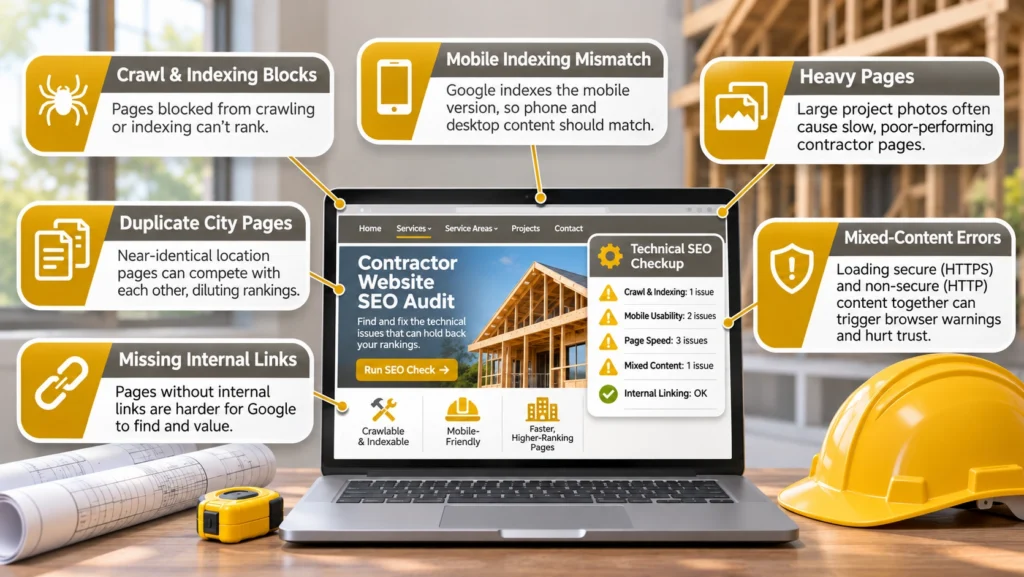
- Pages blocked from crawling or indexing cannot rank, so check access first.
- Google indexes the mobile version of a page, so phone and desktop content should match.
- Heavy project photos are the most common cause of slow contractor pages.
- Near-identical city pages compete with each other, and canonical tags do not fix thin content.
- Mixed-content errors trigger browser warnings that cost trust and leads.
- Pages with no internal links are hard for Google to find and value.
Why Technical Problems Put a Ceiling on Rankings
Technical SEO is the structure that lets everything else work. Strong on-page content and trusted off-page backlinks only count if search engines can reach, read, and index the pages they point to. A site can look polished to visitors and still be invisible to Google.
Many contractor sites inherit these problems from earlier redesigns, plugin changes, or template shortcuts. Fixing them is rarely glamorous, but it protects the work already done. It is also one layer of a broader contractor ranking strategy that combines technical health, content, local signals, and authority.
Crawl Blocks and Indexing Problems
If Google cannot reach a page, it cannot rank it, which makes crawl and indexing problems the most damaging technical issue. A contractor may find that the homepage appears in search while pages such as commercial tenant improvements or emergency repair are blocked or missing. The usual causes are a misconfigured robots.txt file, a stray noindex tag, and broken internal links. Pages that Google finds but declines to index have their own causes, which our guide to contractor indexing issues covers in detail.
These problems often arrive with a redesign. A new site launches with its staging noindex setting still on, old URLs change without 301 redirects, or a plugin update rewrites robots.txt. It helps to know the difference between the controls. Robots.txt manages crawling, while a noindex tag tells Google not to show a page it has crawled. A page blocked in robots.txt can even appear in results as a bare URL if other sites link to it.
Check each key service page in the URL Inspection tool and the Pages report in Search Console. Fix broken internal links after any portfolio update or service rename, and keep an XML sitemap that lists only the pages you want indexed.
Mobile-First Indexing and Content Parity
Google predominantly uses the mobile version of a page when it indexes and ranks content. That creates a risk for contractors whose mobile templates trim detail to save space. A project description, specification list, or service area paragraph that appears on desktop but not on a phone may not count toward the page at all.
Accordions and tabs are generally fine when the content is part of the page as it loads, as opposed to being fetched only after a visitor taps. Check key pages on a real phone and compare them with desktop. Confirm that tap-to-call links work, forms submit, and sticky buttons do not cover text, since these problems cost calls even when rankings hold. The URL Inspection tool’s live test also shows the rendered page Google sees, which makes missing mobile content easier to spot.
Page Speed, Core Web Vitals, and Heavy Project Photos
Contractor sites are image-heavy, with galleries, before-and-after sliders, and hero video. Uncompressed photos are the most common reason these pages feel slow. Core Web Vitals measure loading, responsiveness, and layout stability. Google’s published targets for a good experience are a Largest Contentful Paint within 2.5 seconds, an Interaction to Next Paint (INP) under 200 milliseconds, and a Cumulative Layout Shift below 0.1, measured across most real visits.
Compress and resize photos, serve modern formats such as WebP or AVIF, and lazy-load images below the fold. Trim third-party scripts, since chat widgets, review plugins, and scheduling tools often delay responsiveness. Google says page experience feeds its ranking systems but does not override relevance, so treat speed as a modest ranking input and a conversion issue. The detailed metric breakdown is in the guide to contractor Core Web Vitals.
Duplicate Pages and Canonical Confusion
Contractors create duplicates in two ways. One is cloning a service page for every town and changing only the place name. The other is serving the same page at several URLs, such as with and without www, with a trailing slash, or with tracking parameters. Google says it has no duplicate content penalty, but it groups similar pages and chooses one to show, which may not be the one you wanted.
A canonical tag tells Google which URL you prefer. It works as a hint, not a command, and it suits true duplicates like parameter URLs. It is not a cure for thin location pages, because pointing every city page at one canonical asks Google to drop the rest. Pages with real local detail solve that problem, and the guide to contractor canonical tags explains when each approach fits.
HTTPS and Mixed-Content Errors
HTTPS is the baseline. Google has described it as a lightweight ranking signal, and browsers warn visitors about insecure pages, which matters when you ask someone to submit a form. Mixed content happens when a secure page loads an image, script, or embed over HTTP. Browsers may block or flag those items, so a gallery or form can quietly fail.
Redirect every HTTP URL to HTTPS with a 301, update hard-coded http:// links in older posts, and check embedded maps, image libraries, and third-party plugins. The browser console lists mixed-content warnings page by page, and a site crawler finds them in bulk. The ranking effect is hard to measure, but the trust cost is real.
Site Architecture and Orphan Pages
An orphan page has no internal links pointing to it. Old blog posts and project case studies often end up this way after a navigation change. Google finds pages through links and sitemaps, and internal links also signal which pages matter, so an orphan gets neither benefit. To find them, compare a crawl of your site against your sitemap and your list of published pages. Anything that appears in the sitemap but not in the crawl needs links from related pages.
Aim for a logical structure where important pages are reachable in a few clicks, with residential and commercial services grouped under clear parent pages. Google gives no fixed click-depth rule, but closer to the homepage generally signals more importance. A clean site architecture also makes future audits faster, because every new page has an obvious home and links in from related pages.
What to Fix First
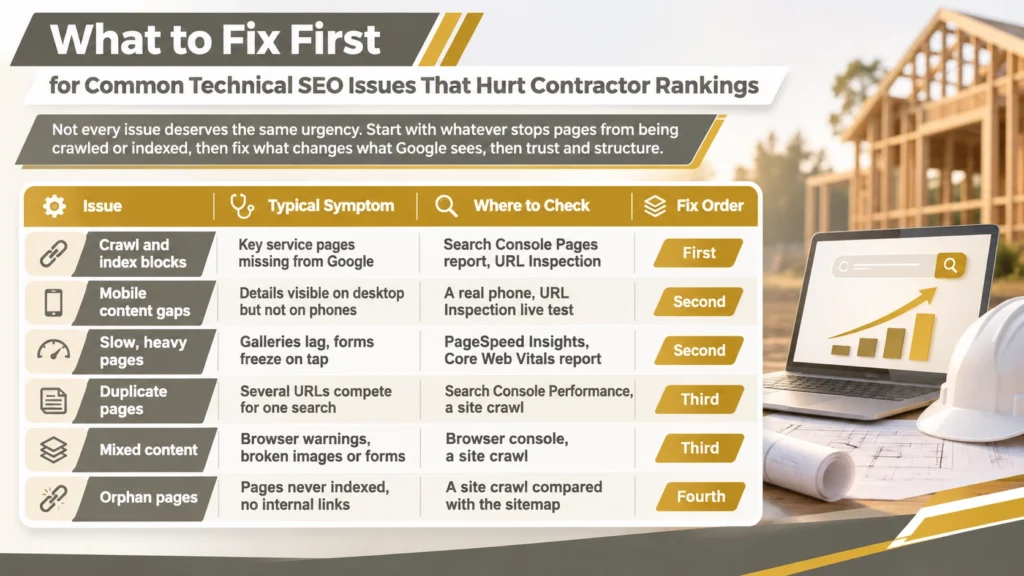
Not every issue deserves the same urgency. Start with whatever stops pages from being crawled or indexed, then fix what changes what Google sees, then trust and structure. The table shows a practical order.
| Issue | Typical Symptom | Where to Check | Fix Order |
| Crawl and index blocks | Key service pages missing from Google | Search Console Pages report, URL Inspection | First |
| Mobile content gaps | Details visible on desktop but not on phones | A real phone, URL Inspection live test | Second |
| Slow, heavy pages | Galleries lag, forms freeze on tap | PageSpeed Insights, Core Web Vitals report | Second |
| Duplicate pages | Several URLs compete for one search | Search Console Performance, a site crawl | Third |
| Mixed content | Browser warnings, broken images or forms | Browser console, a site crawl | Third |
| Orphan pages | Pages never indexed, no internal links | A site crawl compared with the sitemap | Fourth |
Consider a hypothetical remodeler whose calls dropped a month after a redesign. A quick check shows the kitchen and bathroom pages were launched with a noindex tag, and the old URLs return errors instead of redirecting. Those two fixes matter far more than shaving a second off the homepage, which is why the order in the table starts with access. Speed work still helps, but only once the right pages can be found.
Work through one row at a time, record what you changed, and recheck in Search Console after a few weeks. If the list is long or unclear, many contractors bring in a team that can audit and fix technical SEO before more content is published. Construction Marketing Services offers technical SEO services for contractors that cover these checks.
Structured Data and AI Search Readiness
Structured data such as LocalBusiness and Service markup helps search engines understand who you are and what you offer, and invalid or mismatched markup is a technical issue too. It does not guarantee rich results. The guide to contractor schema markup covers what to add and where.
The same fundamentals apply to AI answer features. Google’s guidance says pages need to be crawlable, indexable, and eligible to appear with a snippet, with no special markup required. A site with crawl blocks or missing content is poorly placed for either, as the article on AI search for contractors explains.
Things to Know
- Check for leftover staging noindex tags and missing redirects after every redesign.
- Robots.txt controls crawling, while noindex controls whether a crawled page can appear.
- Never point every city page’s canonical tag at one page to solve duplication.
- Test key pages on a real phone, including tap-to-call links and forms.
- Google sets no required audit schedule, so base yours on how often the site changes.
- Keep a change log so ranking shifts can be tied to specific fixes.
Frequently Asked Questions
What is technical SEO for contractors?
Technical SEO is the work that lets search engines crawl, understand, and index a contractor’s website.
It covers crawl access, mobile content, page speed, duplicate pages, security, and site structure. Strong content and links cannot help a page that Google cannot reach or index.
How do I know if Google can index my contractor website?
Check the Pages report and URL Inspection tool in Google Search Console for each key service page.
Both show whether a URL is indexed and, if not, the reason Google gives. A search for your page title in quotation marks is a quick second check, though it is less reliable than Search Console.
Does page speed really affect contractor rankings?
Google says Core Web Vitals feed its ranking systems, but relevance still matters far more than speed.
A fast page will not outrank a better answer, yet a slow one loses visitors before they call. Treat speed as both a modest ranking input and a conversion issue.
Do duplicate city pages hurt rankings?
Google has no duplicate content penalty, but near-identical pages compete and Google may show only one.
Pages that change only the town name add little value and rarely earn their own rankings. Give each location page real local detail instead of relying on canonical tags to fix it.
How often should a contractor run a technical SEO audit?
Run a light check each quarter and a full audit after any redesign, migration, or major plugin change.
Google sets no required schedule, so this is a practical habit. Most serious problems appear right after site changes, which is why the check after a redesign matters most.
Inspect the Foundation Before Adding More Content
A website is closer to a building than a brochure, and it needs periodic inspection. Before publishing the next batch of pages, confirm that the pages you already have can be crawled, indexed, and loaded quickly on a phone. Start with the key service pages, fix blocks first, and let the rest follow in order.