Internal linking for a construction website means connecting related pages with descriptive links so search engines and visitors can move from broad topics to the specific service pages that generate inquiries. A site built around hubs and spokes, clear anchor text, and regular audits passes authority to its money pages, supports topical authority, and turns research traffic into estimate requests.
Key Takeaways
- Hub-and-spoke linking shows deep expertise in each service category.
- Descriptive anchor text tells search engines what the destination page covers.
- Links from popular pages pass authority to the service pages that earn quotes.
- Links should follow the customer’s path from question to hiring decision.
- Related services links let residential and commercial work support each other.
- Quarterly audits catch orphan pages and broken links before rankings slip.
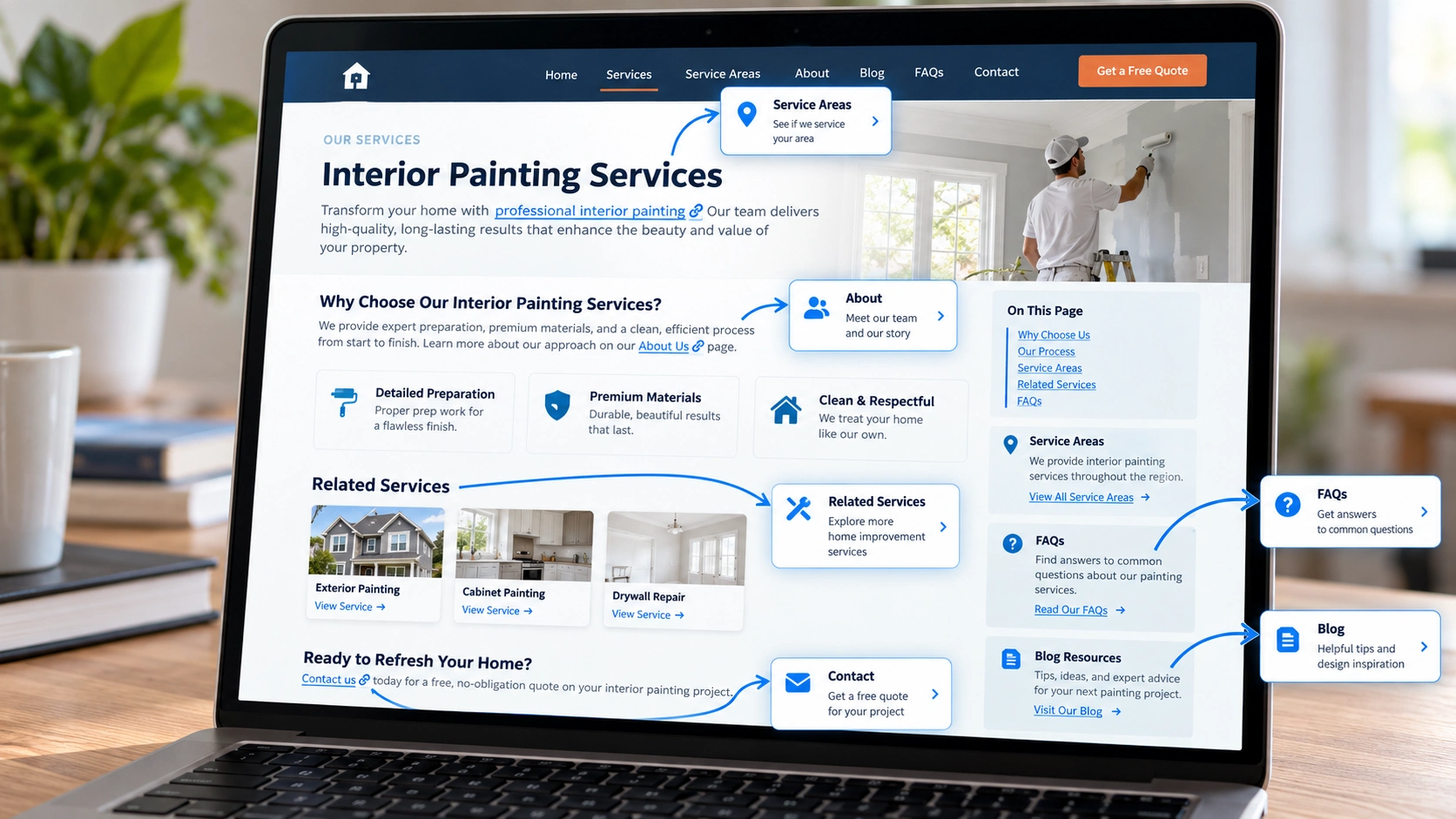
Why Internal Links Decide Which Pages Get Found
A good internal linking structure works like a well-organized job site: everything has a place, and everyone can find the next step. If the pages that attract the most visitors never point toward the service pages, lead generation stalls. The visitor reads an answer, feels satisfied, and leaves, because nothing on the page suggested what to do next.
Search engines face the same problem. A site without a clear linking structure forces them to guess which pages matter most. The goal is a logical path that proves expertise from the first question to the final estimate, the way a project moves from demolition to trim work. Every link should have a reason to exist, and every important page should be reachable through links from other relevant pages.
The Hub-and-Spoke Model for Trade Authority
The hub-and-spoke model is the most reliable way to organize a construction site. A hub is a broad page, such as Residential Remodeling, that links out to specific spoke pages like kitchens, bathrooms, and basements. Each spoke links back to the hub. This signals deep, categorized expertise instead of generalism, and it gives each spoke a clear parent. Strong spokes also depend on pages that are built to attract high-intent visitors, as covered in practical contractor service page SEO.
The same pattern works for commercial contractors. A Tenant Improvements hub might link to partition walls, commercial flooring, and acoustic ceilings. Grouping related pages tells search engines the topics belong together, which helps a site rank for both the broad service and the specific technical terms inside it.
- Pick the broad categories that match how customers describe their needs, such as residential remodeling or tenant improvements.
- List the specific services that belong under each category.
- Link every spoke to its hub, and link the hub to every spoke.
- Add links between closely related spokes, such as kitchens and bathrooms, only where a reader would find them useful.
Anchor Text: Moving Beyond Generic Links
Anchor text is the signpost language that search engines read to understand a link’s destination. Generic phrases such as click here or learn more waste the chance to reinforce expertise. Descriptive phrases that match trade terminology work better, such as emergency roof tarping or hail damage inspection instead of a vague our services link. A good rule is that anchor text should echo the title and topic of the page it points to, which is why it pairs well with a clear contractor page metadata strategy.
Over-optimization is the opposite risk. Using the identical keyword for every link looks manipulative and reads awkwardly. Natural variation is better. One paragraph can link to an HVAC page with furnace repair, and another can use heating system maintenance. That variety is what a genuinely helpful site looks like to modern search algorithms.
Funneling Authority to High-Value Service Pages
Most contractor websites build their strength on a handful of pages, usually the homepage and a guide or two that earned attention. Internal links move that strength to the pages where people request quotes. This matters most when launching a new service line. A roofing company adding solar installation can link to the new page from popular articles about roof lifespan or energy efficiency, which passes value immediately and helps it rank faster than an orphan page would. It is a core part of any contractor website SEO support plan.
The same idea applies to existing money pages that have fallen behind. Before commissioning new content, look at which service pages have few internal links and which popular pages have none pointing outward. Adding a handful of relevant links is often one of the cheapest improvements available.
Aligning Links With the Customer Search Journey
Internal links should follow homeowner logic. Most customers begin with a how-to or cost question, and a post answering how much a deck costs should naturally link to the Deck Construction page. Leaving out that next step sends the visitor back to the search results, and often to a competitor. Each link should move a prospect from general interest to understanding how the company handles the specific work, which is the same thinking behind a strong contractor on-page SEO guide.
This is both a sales tactic and a user-experience requirement. When visitors find a clear answer and a logical next step, they stay longer and are more likely to act. Search engines tend to reward sites that keep readers engaged, so a link that helps a person is usually a link that helps rankings too.
Cross-Linking for Residential and Commercial Synergy
Contractors who serve both residential and commercial customers can use internal links to show the full scope of their work. A Residential Electrical Repair page can link to Commercial Electrical Contracting, which catches the business owner who finds the residential page and realizes the company also handles warehouse or office work.
This takes some restraint. Homeowners should not be confused by industrial jargon, so a Related Services section near the bottom of the page works better than a prominent link in the first paragraph. Done carefully, it widens the range of searches the site can satisfy and shows that the business can handle projects of different sizes and complexity.
Where Links Belong on the Page
Placement matters as much as the destination. Links inside the main body of a page, surrounded by relevant text, usually carry more weight than links in menus or footers, because they signal that the writer chose them for a reason. Menus and footers still do useful work by giving every main category a crawlable path, but they should not be the only way a service page is reached.
There is no official limit on internal links per page. Google advises keeping the number reasonable, which in practice means a link should appear where a reader would naturally want it. A service page might link to its hub, a few related services, and a proof page. A long article can carry more, as long as each link adds something the reader would otherwise have to search for.
Internal Link Types for Contractor Sites
The table below summarizes the main link types a contractor website needs, where each belongs, and what it accomplishes.
| Link Type | Example | Where It Sits | What It Does |
| Hub to spoke | Residential Remodeling page to a Kitchen Remodeling page | Body of the hub page | Shows depth inside a service category |
| Spoke to hub | Kitchen Remodeling page back to Residential Remodeling | Intro or related services block | Reinforces the category and gives visitors a way back |
| Blog to service | A deck cost article to the Deck Construction page | In the body, near the answer | Moves researchers toward hiring |
| Service to related service | Residential Electrical Repair to Commercial Electrical Contracting | Related services section at the bottom | Shows scope and captures adjacent searches |
| Service to proof | A service page to a matching project write-up | Mid-page, next to the claim it supports | Backs up the service with real work |
| Menu and footer | Main service categories | Sitewide | Gives basic crawl access without carrying the relevance |

Auditing for Orphan Pages and Broken Paths
A linking strategy needs maintenance. Orphan pages are pages with no internal links pointing to them, and they struggle to rank and stay invisible to customers. Reconnecting them to the main flow of the site ensures that content effort turns into visibility. Broken internal links that lead to 404 errors are a red flag, especially in construction, where precision is expected. Keeping them in check is part of ongoing contractor content optimization services.
A simple audit takes only a few steps and can be repeated every quarter.
- Crawl the site with a tool such as Screaming Frog and export every URL.
- Compare the list to your sitemap and published pages to find orphans.
- Filter the crawl for 404 errors and redirect chains.
- Fix broken links at the source, and redirect removed pages to the closest relevant page.
- Add links to each orphan from at least one related page, then recheck.
Regular checks keep the site tidy, which builds the trust needed to convert casual visitors into long-term clients.
Things to Know
- Give every new page at least one link from an established page the day it publishes.
- Changing a URL without a redirect breaks every internal link that pointed to it.
- Image links count as links, so descriptive alt text on those images acts as the anchor.
- Linking to the same page repeatedly in one paragraph adds clutter without adding value.
- Google Search Console shows which pages receive the most internal links, which makes weak spots easy to find.
- A Related Services block is an efficient way to keep cross-links consistent across many pages.
Frequently Asked Questions
What is internal linking, and why does it matter for contractors?
Internal linking connects the pages of your own website, and it helps search engines and visitors find your most important service pages.
Search engines discover pages by following links, and they use the surrounding text to judge what each page covers. For a contractor, that means a well-placed link from a popular article to a service page can be the difference between a quote request and a lost visitor.
How many internal links should a contractor page have?
There is no fixed number. Google advises keeping links to a reasonable amount that a reader would actually use.
A service page usually needs links to its hub, a few related services, and a proof page or two. A long blog post can carry several contextual links, but if a page starts to feel crowded, the links are probably too many.
What anchor text should contractors use for internal links?
Use short, descriptive phrases that name the service or topic of the destination page, varied naturally across the site.
A phrase like emergency roof tarping tells a reader and a search engine what to expect, while click here tells them nothing. Repeating the exact same phrase for every link can look forced, so mix in natural variations such as furnace repair and heating system maintenance.
How do I find orphan pages on a contractor website?
Crawl the whole site, compare the results to your list of published pages, and flag any page that no other page links to.
A crawler such as Screaming Frog and the sitemap are the usual starting points, and Google Search Console can show which pages receive internal links. Once you find an orphan, add links to it from related pages, or remove it if it no longer has a purpose.
How often should internal links be audited?
Check every quarter, and again after any batch of new pages, redesign, or URL change.
Links break quietly. A renamed page, a deleted service, or a new blog series can leave dead ends and orphans behind without anyone noticing, so a short recurring check is cheaper than a big cleanup after rankings slip.
Building a Site That Guides the Visitor
Internal linking is more than an SEO checkbox. It is the blueprint that directs customers toward a hiring decision. Organizing the site into hubs and spokes, using clear anchor text, and eliminating orphan pages means no expertise goes unnoticed. A well-linked website proves authority in the trades and gives visitors a guided path from the first question to the estimate request.