A strong contractor title tag names the service first, the city second, and the brand last, in roughly 50 to 60 characters. A strong meta description adds a reason to call: the service, the area, one honest proof point, and a clear next step. Together they decide whether a searcher clicks your page or a competitor’s, and they are among the fastest improvements a service page can get.
Key Takeaways
- Lead every title with the service, then the city, then the brand.
- Keep titles near 50 to 60 characters so the key words are not cut off.
- Write meta descriptions of roughly 120 to 155 characters with a clear next step.
- Give every service and location page its own unique title and description.
- Only claim what is true, such as licensed, insured, free estimates, or 24/7.
- Google may rewrite weak or mismatched titles, so match them to the page.

What Title Tags and Meta Descriptions Actually Do
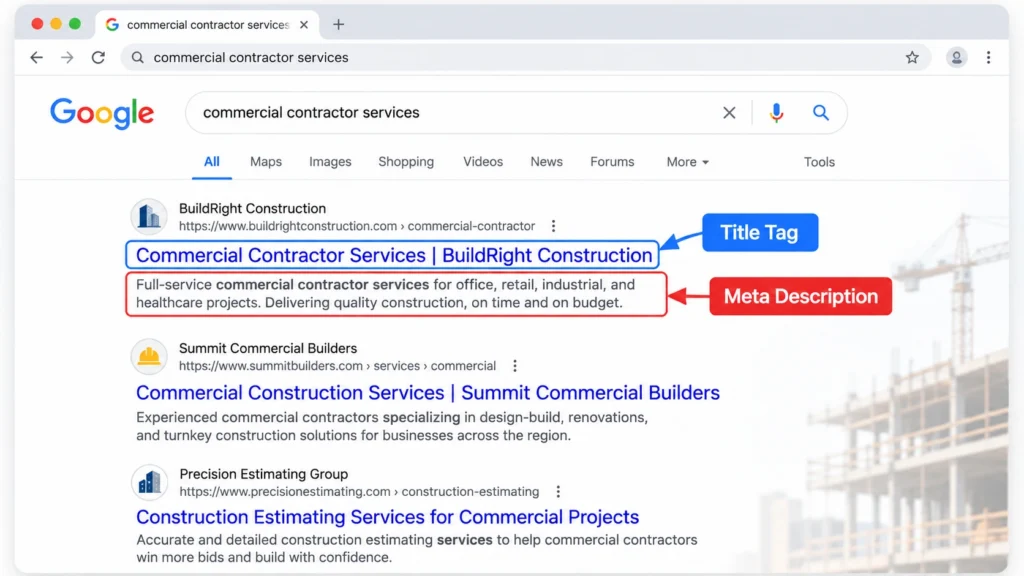
The title tag is the blue headline in a search result, and the meta description is the short text beneath it. The title is a relevance signal, because it tells search engines what the page is about, and it is also the first thing a homeowner reads when comparing three roofers or plumbers. The description is not a direct ranking factor, but it shapes the snippet, which makes it the closest thing a contractor has to a free advertisement in the results.
Because both elements shape how a page looks before anyone visits it, they carry more weight than their size suggests. They are also easy to get wrong at scale. A site with fifteen service pages and the same generic title on each is competing against itself. This is a core part of any construction industry SEO services plan, and it is one of the cheaper fixes to roll out.
A Title Tag Formula for Contractor Service Pages
The simplest reliable formula is service, then location, then brand. The service goes first because it carries the strongest intent, the location qualifies the search, and the brand sits at the end where a long name cannot push the important words out of view. This works best on pages built around one service, as described in the contractor service page SEO strategy, because the title should describe exactly what the page delivers.
A few small decisions make the formula work in practice.
- Start with the exact service name customers use, such as roof replacement or AC installation.
- Add the city or neighborhood only when the page really covers it.
- Place the brand at the end, separated by a vertical bar or a hyphen.
- Add a short qualifier, such as emergency, only when it is true and relevant.
Superlatives such as best, cheapest, or number one are worth avoiding. They cannot be proven, they read like every other contractor, and they take up space that a specific service could use.
Matching the Title to What the Searcher Wants
A title should reflect the intent behind the search. Someone searching for an emergency plumber wants speed, so the title should say emergency and name the city. Someone searching for kitchen remodeling costs wants information first, so the title can promise a cost guide or pricing range. Mixing these up, for instance by giving a research page a hard-sell title, creates a mismatch that costs clicks. Deciding which keyword belongs on which page is covered in the contractor search intent strategy, and the title is where that decision becomes visible.
Transactional pages, such as a service or location page, work best with a plain service-and-city title. Informational pages, such as blog posts, can use a more descriptive title that hints at the answer. In both cases, the first few words should tell the reader exactly what they will find.
Writing Meta Descriptions That Earn the Click
A good meta description reads like a short, honest pitch. It should mention the service and the area, give one proof point or offer the business can actually back up, and end with a clear next step. Generic openers such as learn more about or welcome to waste the limited space, and they make every contractor’s snippet look the same.
- The service, using the same wording as the title.
- The area served, if the page is local.
- One true proof point, such as licensed and insured crews or free estimates.
- A clear action, such as call now or request an estimate.
Three working examples show how this plays out. For roofing: “Roof replacement in Denver by licensed, insured crews. See materials, timelines, and typical costs, then request a free estimate.” For plumbing: “Burst pipe or no hot water? Our licensed Denver plumbers handle emergency calls fast. Call now or request service online today.” For HVAC: “Need a new AC or a fast repair in Denver? Compare system options, see what installation includes, and book a visit this week.” Each one names the service and place, offers something specific, and ends with an action.
Length and Pixel Width: What Actually Fits
Google does not publish a character limit for titles or descriptions. What gets displayed depends on pixel width and device, which is why a title with several wide letters gets cut off sooner than one with narrow letters. A working range of about 50 to 60 characters for titles and about 120 to 155 characters for descriptions keeps most results intact.
The practical rule is to front-load. Put the service and city in the first half of the title and the strongest part of the pitch in the first line of the description. If the ending gets trimmed, nothing important is lost, and the result still reads as complete.
Titles for Multi-Service and Multi-Location Sites
Contractors with many service pages or several cities need a template, because writing each one from scratch invites inconsistency. A template such as service, city, brand gives every page a predictable structure, and the variables make each one unique. The risk is stopping there. Every page still needs to be checked, and where two pages target nearly the same phrase, the titles should be different enough to reflect the real difference in content.
Avoid listing several cities in one title. A title that names five towns reads as keyword stuffing and rarely matches what any single searcher wants. If a page really serves one area, name that area. If the business serves several areas, each deserves its own page and its own title.
Why Google Rewrites Titles and What to Do About It
Google can display a different title or description than the one in the page code. This tends to happen when the title is vague, repeated, stuffed with keywords, or disconnected from the page’s main heading and content. A title that says Home, or a description that has nothing to do with the page, gives Google little reason to keep it. Making the title, the main heading, and the opening paragraph agree with each other is the most reliable fix, and it is one of the core contractor on-page SEO best practices.
A rewritten title is not always a problem. Sometimes Google’s version is fine. But if a rewrite drops the service or the city, it is a sign the original needs work, and a quick check of how the page appears for its main search is worth the time.
Weak and Stronger Titles by Service
The table below shows common weak titles from contractor sites next to stronger versions, using a fictional business and city.
| Service Page | Weak Title | Stronger Title | Why It Works |
| Roof replacement | Home | Summit Roofing | Roof Replacement in Denver | Summit Roofing | Names the service and city, with the brand last |
| Emergency plumbing | Plumbing – Plumber – Plumbing Services – Plumber Denver | Emergency Plumber in Denver | Summit Plumbing | One clear phrase instead of repeated keywords |
| HVAC installation | Welcome to Summit HVAC | AC Installation and Repair in Denver | Summit HVAC | Matches how people search for the work |
| Kitchen remodeling | Services | Summit Builders | Kitchen Remodeling in Denver | Summit Builders | Gives each service its own unique title |
| Electrical panel upgrade | Best Electrician Around | Electrical Panel Upgrades in Denver | Summit Electric | Replaces an unprovable claim with a specific service |
Auditing and Testing Your Metadata
Metadata is easy to set and forget, so it helps to review it on a schedule. A crawl can export every title and description on the site and flag missing, duplicate, or overly long ones in minutes. Search Console shows which pages get plenty of impressions but few clicks, and those are the best candidates for a rewrite. This kind of review is a routine part of ongoing website page SEO support.
- Crawl the site and export every title and description.
- Flag missing, duplicate, and over-length entries.
- Sort pages by impressions in Search Console and note those with a low click rate.
- Rewrite the weakest titles first, changing one element at a time.
- Wait several weeks, then compare clicks before changing anything else.
Things to Know
- Every page needs its own title and description, because duplicates compete with each other.
- Google decides what to display, so metadata that matches the page is more likely to be kept.
- Meta descriptions are not a direct ranking factor, but a better snippet can lift clicks.
- Claims such as licensed, insured, 24/7, or free estimates must be accurate.
- Name a city in a title only when the page truly covers that area.
- Change one element at a time on a ranking page so you can tell what worked.
Frequently Asked Questions
How long should a title tag be for a contractor page?
Aim for roughly 50 to 60 characters, since Google truncates titles by pixel width rather than a fixed character count.
There is no official character limit, and wider letters take up more space than narrow ones. Keeping the service and city in the first half of the title means the most important words stay visible even if the end gets cut off.
What should a contractor put first in a title tag?
Put the service first, then the city, then the brand name if space allows.
The service phrase carries the strongest intent, so it belongs where searchers and search engines see it first. The city qualifies the search, and the brand works best at the end, where a long name cannot crowd out the words that earn the click.
Does a meta description affect rankings?
Not directly, but a clear and specific description can raise the share of searchers who click your result.
Google has said that the meta description is not a direct ranking factor. It still shapes the snippet people read before deciding which contractor to call, so it works as a small piece of sales copy rather than an SEO checkbox.
Why does Google show a different title than the one I wrote?
Google may rewrite a title that looks too long, stuffed with keywords, or out of step with what the page says.
Generic titles like Home or Services are common targets, as are titles that repeat the same phrase several times. Matching the title to the page’s main heading and content gives Google less reason to replace it.
Should every service page have a unique title and description?
Yes. Duplicate titles and descriptions make pages look interchangeable to both search engines and searchers.
Each service and each location page answers a different search, so each deserves its own wording. A short template with the service and city swapped in is fine as a starting point, as long as every page ends up with distinct, accurate text.
Writing Metadata That Earns the Click
Title tags and meta descriptions are small pieces of text with an outsized job. A clear service, an honest location, and one specific reason to call turn a search result into a visit, and a repeatable template keeps the whole site consistent. Treat each title as the first sentence of the sales conversation, and review it as the site grows.