
A good contractor content refresh strategy reviews core service pages every quarter, cost and local pages twice a year, and everything else about once a year, then chooses between refreshing, rewriting, merging, or retiring each page based on what the data shows. Google publishes no required update schedule, so the goal is accuracy and usefulness, not touching pages to look active.
Key Takeaways
- Content decays when facts change, competitors improve, or searchers want something different.
- Core service pages deserve a quarterly look, and cost and local pages a review twice a year.
- Search Console shows decay early, through falling clicks and slipping average position.
- Each aging page needs one of four decisions: refresh, rewrite, merge, or retire.
- Change a visible date only after a meaningful edit, and keep a log of what changed.
- Judge a refresh over several weeks, not days, using the same period from last year.
Why Contractor Content Goes Stale
Content decay is the slow loss of rankings and traffic as a page ages. For contractors it has three common causes. Facts change, such as material prices, code requirements, product lines, and warranty terms. Competitors publish more thorough pages. And the way people search shifts, so a page written around one question no longer answers the one homeowners ask now.
Trades add causes of their own. Demand is seasonal, so a furnace tune-up page last touched two winters ago will not be ready when fall searches begin. Businesses change too, with new service areas and better projects, yet the website keeps describing the company as it was.
Google does not publish a rule that pages must be updated every few months, and recency matters more for some searches than others. For most contractor searches, accuracy matters more than the date. A stale price range or an outdated code reference can cost you the call before a homeowner ever reaches your phone number.
Signals a Page Needs Attention
Waiting for a traffic crash is the slowest way to find decaying pages. Data and day-to-day business give earlier warnings.
- Clicks fall compared with the same period last year, even though demand has not changed.
- Average position slips, for example from the top five results to the second page.
- Impressions hold steady while clicks fall, which suggests the title or answer has lost its pull.
- Two of your own URLs appear for the same query and trade places, a sign of overlap.
- Estimators say customers quote a price or claim from the page that no longer matches reality.
- Photos, offers, or service details show a year or season that has already passed.
In Search Console, open the Performance report, compare the last three months against the same three months a year earlier, and filter by page. Comparing with last year rather than last month keeps seasonality from fooling you. Search Console keeps about 16 months of data, so exporting it each quarter preserves the history you need for these comparisons.
A Review Schedule by Page Type
Different pages age at different speeds, so one calendar for the whole site wastes effort. Pages tied to prices, seasons, and local rules need the most frequent attention, while a stable how-to article can wait longer. The table below is a practical starting point.
| Page Type | Review Cadence | What to Check | Update Triggers |
| Core service pages | Every quarter | Process, materials, service area, proof, calls to action | New offerings, changed warranties, slipping rankings |
| Cost and pricing posts | Twice a year | Price ranges, price drivers, dated figures | Material or labor cost shifts |
| Project pages and case studies | After each job, then yearly | Photos, results, captions, links to service pages | Newer, better jobs in the same category |
| Local and service area pages | Twice a year | Local conditions, codes, nearby projects | New areas served, code or permit changes |
| Seasonal posts | Before the season starts | Dates, offers, maintenance advice | Storm, heating, or cooling season approaching |
| FAQ and how-to posts | Once a year | Accuracy, completeness, broken links | Rankings drop, new customer questions |
These cadences are working habits, not Google requirements. A roofer in a storm-prone area may need to review cost content more often, while a specialty trade with stable products may need less. Adjust the calendar after two cycles, based on how many pages actually needed changes.
Refresh, Rewrite, Merge, or Retire
Once a page is flagged, decide what kind of work it needs. Treating every aging page as a quick edit leaves weak pages weak, while rewriting everything wastes budget. Four decisions cover almost every case.
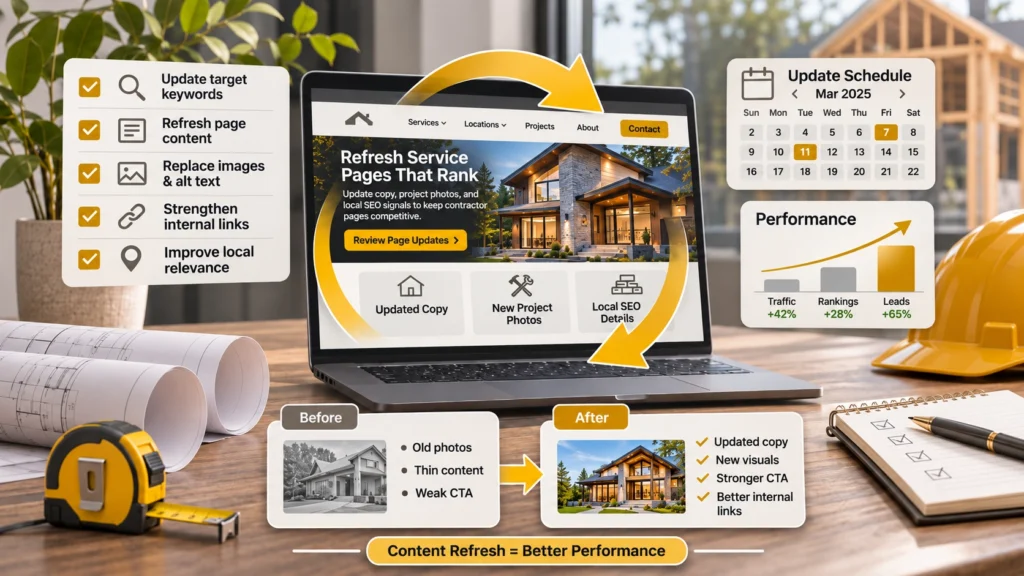
- Refresh when the structure is sound but facts, examples, photos, or links are dated, and the page still earns impressions.
- Rewrite on the same URL when the topic is right but the page misses what searchers now expect. Keeping the URL protects its history and links.
- Merge when two or more pages answer the same question. Fold the best material into the strongest URL and redirect the others to it.
- Retire when the topic no longer fits your services or area and the page has no traffic, links, or leads. Redirect it to the closest useful page.
Merging often points to a deeper keyword problem. When a blog post and a service page chase the same search, following a blog vs service page keywords strategy decides which page keeps the query and which one supports it. Make that call before editing, or the refresh will recreate the overlap.
A Step-by-Step Refresh Workflow
A repeatable process keeps refreshes fast, especially when an office manager does them between other tasks. Work through these steps for each flagged page.
- Pull the page’s last 12 months of Search Console data and note which queries it already earns.
- Read the page as a homeowner would and mark every price, product, code reference, date, and photo that looks dated.
- Search the main query and note what the pages that now rank cover that yours does not.
- Update the facts, date every figure, and fill the gaps with detail from estimators and recent jobs.
- Tighten the first paragraph, title, and meta description so the answer and the reason to click are clear.
- Add internal links to newer related pages, and check that older links still work.
- Publish, record the change and the reason in a log, and request indexing for key pages in the URL Inspection tool.
Step six is where a refresh pays off beyond one page. Every new article or project you publish should be linked from the older pages that cover related ground, which is how the clusters described in the contractor topical authority best practices stay connected. Requesting indexing asks Google to recrawl a URL, but it does not guarantee a ranking change or a set timeline.
Example: Refreshing a Roof Replacement Cost Post
Consider a hypothetical roofing company with a cost article written two years ago. It sits on the second page for its main query, impressions are steady, and clicks are down compared with last year. The estimators mention that homeowners keep quoting figures from the post that are now too low.
The refresh starts with the numbers. The team replaces the old ranges with figures from recent estimates and labels them with the month they reflect. It adds the factors that move a price, such as tear-off versus overlay, roof pitch, and materials. It swaps in new photos and links to a recent project page, the kind of proof covered in the contractor case study SEO strategy. None of this needs a new URL, only honest updates from people who price roofs every week.
Measuring Whether a Refresh Worked
Give a refresh time before judging it. Google has to recrawl the page, reprocess it, and compare it with other results, which can take weeks rather than days. Check impressions, average position, and clicks for the refreshed page against the same period last year, then look at the numbers that matter most to a contractor: calls, form submissions, and quote requests that began on that page.
Dates deserve care. Show a visible last-updated date only when the page changed in a meaningful way, since Google’s guidance advises against artificially updating dates. A change log with the date, the page, what changed, and why makes later results far easier to interpret.
Refresh Mistakes That Cost Rankings
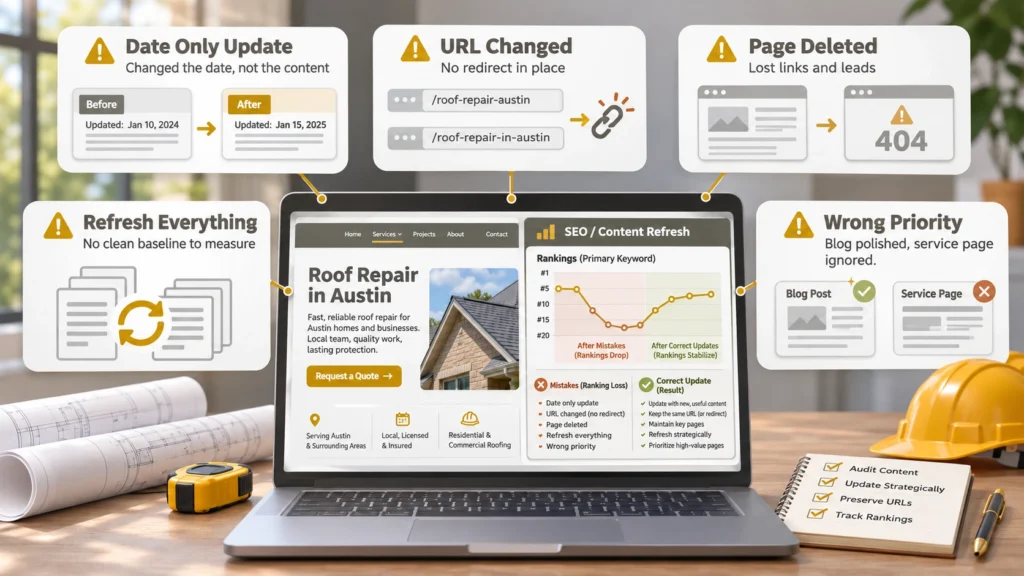
Most refresh problems come from doing too much of the wrong thing. Start with the pages closest to revenue, usually service pages and cost content, and avoid these patterns.
- Changing only the date and calling it an update.
- Changing a URL without a redirect, which strands links and rankings.
- Deleting old pages that still earn links or leads.
- Refreshing the whole site at once, so nothing can be measured.
- Ignoring the pages that drive calls while polishing blog posts nobody reads.
Who Should Own the Refresh Cycle
Refreshing needs two kinds of knowledge: what the data says and what the field says. Someone has to read Search Console and keep the log, and someone who prices and builds jobs has to confirm every figure. Many contractors pair the office with construction content writing services so the drafting is handled, while the owner or estimator reviews accuracy before publishing.
Refreshing also works best as part of a wider plan. Pages that are accurate and well maintained still need strong technical health and local signals, which is where organic visibility services for contractors fit in. Construction Marketing Services offers contractor content optimization that includes audits and update schedules, so the work happens on a calendar instead of when a page finally fails.
Things to Know
- Google sets no required update frequency, so base the schedule on how fast your trade changes.
- Date every price range, and update it when estimates move.
- Keep the URL when rewriting, unless there is a strong reason to change it.
- Redirect merged or retired pages instead of simply deleting them.
- Never state credentials, licenses, or years in business that have not been verified.
- Keep a change log so results can be tied to specific edits.
Frequently Asked Questions
How often should a contractor website be updated?
Review core service pages every quarter and most other content once or twice a year.
Google publishes no required update schedule, so the right rhythm depends on how fast prices, products, and local conditions change in your trade. Cost posts and seasonal pages usually need attention more often than a stable how-to article.
What is content decay?
Content decay is the gradual loss of rankings and traffic a page suffers as it ages.
It usually comes from outdated facts, stronger competing pages, or a shift in what searchers want. In Search Console it shows up as falling clicks or a slipping average position on a page that used to perform.
Should I change the publish date when I update a post?
Only change a visible date when the page has genuinely changed in a meaningful way.
Google’s guidance on dates advises against artificially updating them without substantive edits. A simple approach is to show the original date and a separate last-updated date, and to change the second one only after a real revision.
Should I delete old blog posts that get no traffic?
Not automatically, because a low-traffic page may still earn links, answer a useful question, or merge into a stronger page.
Check whether the topic fits your services and whether the page has backlinks or leads before deciding. If it is truly irrelevant, redirect it to the closest useful page, or let it return a not-found response when nothing relevant exists.
How do I find which pages need a refresh?
Compare Search Console performance for the last three months against the same period a year earlier, filtered by page.
Sort by the largest drops in clicks and check which pages lost average position. Then add what your team sees, such as estimators correcting a page on calls or prices that no longer match what you quote.
Keep the Pages That Already Work Working
The pages most worth protecting are the ones already bringing in calls. A steady rhythm of small, honest updates keeps them accurate, keeps them ahead of newer competitors, and costs far less than rebuilding rankings after they slip. Start with the next quarter: list your ten most important pages, put a review date beside each, and let the numbers decide what happens next.


